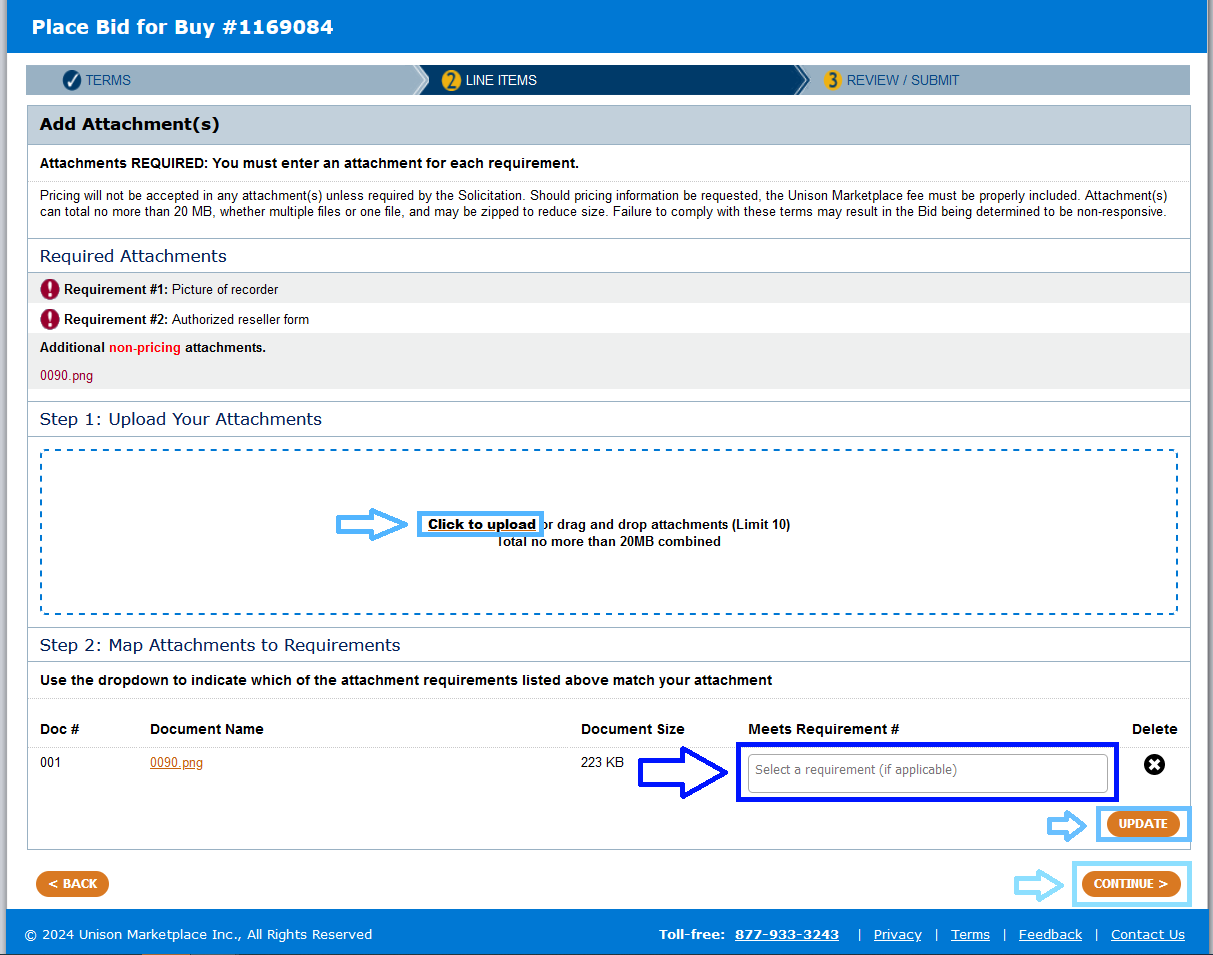
Buyers, through their Solicitations, can set Seller Attachments as ‘required’ or ‘optional’. Sellers can view the request for attachments in the Bidding Requirements section of the buy at the bottom of the page. Please note that pricing information is prohibited to be included in attachments unless specifically requested by the Solicitation. Should the Solicitation request pricing in attachments, Sellers are responsible for including the Unison Marketplace fee within each unit price, so it matches their bid as it appears on the Marketplace.
For Seller Attachments Required Buys, Sellers are required to upload the requested attachment(s) with their bid. The feature to upload attachments is available at the top of the “Line Items” page. For these buys, the Seller’s bid cannot be submitted until an attachment is uploaded and matched to the specific requirement. Please see the instructions below.
- The Seller Attachments will be on the second page titled “Line Items”
- Click Add/Manage attachments
- Step 1: Add the attachments. Click the button titled “Click to Upload” to upload attachments.
- Sellers must attach one document for each requirement laid out by the Buyer.
- Step 2: Map attachments to requirements. Click on the box to the right of the attachment, “Meets Requirement #”, to select the requirement for each attachment. Once the appropriate requirement is selected for each attachment, click “Update” and “Continue”. There should be a check mark next to the requirements indicating that the requirements have been met by the uploaded attachments.
- If an error message shows, please check that each requirement has been selected for the corresponding attachment.
For Seller Attachments Optional Buys, Sellers can choose to include attachments with their bid using the feature on the Line Items page. Please follow the above Steps 1-3 to upload any optional attachments. No requirements need to be selected since the attachments are optional.